Copy File (IDM)
This node copies the input files to an IDM (Infor Document Management) system. An IDM Service must be selected, which contains the configuration to connect to the IDM. A Document Type must be specified for the file being uploaded. Additionally, you can set IDM attributes for the document.
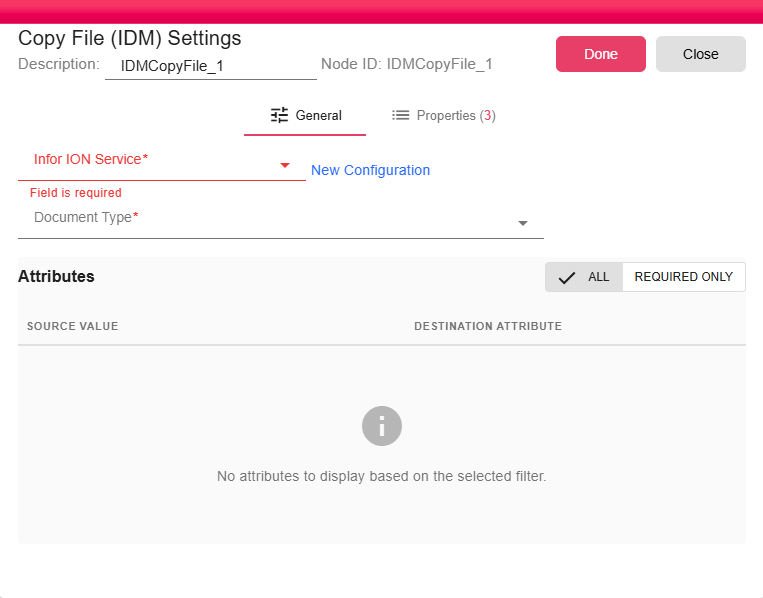
Configuration
Select an existing Infor ION Service configuration or click New Configuration to create one. See Infor ION Service for setup instructions.
Document Type
Specify the IDM Document Type that the uploaded file should be classified under (e.g., InvoiceDocument, CustomerReport). The Document Type must already exist in your IDM system and determines which attributes are available for the document.
IDM Attributes
IDM attributes are metadata fields associated with the document in IDM. They are defined by the Document Type and typically include both required and optional attributes.
Required Attributes
Required attributes are determined entirely by the selected Document Type in your IDM environment — they differ from one Document Type to another. The node UI marks each required attribute with a red asterisk (*).
Use the Required Only toggle in the attributes panel to filter the list down to only the attributes that must be filled for the current Document Type. All required attributes must have a value before the upload will succeed.
Using Properties in Attributes
Attribute values support workflow properties and expressions, allowing you to populate metadata dynamically from the current iteration's data. To reference a property, wrap it in ${ }:
${INVOICE_NUMBER}
${customer.name}
${DateUtil.format(invoiceDate, "yyyy-MM-dd")}
This makes it possible to tag each uploaded document with relevant runtime data — such as the order number, customer ID, or formatted date — without hardcoding values.
Optional Attributes
Optional attributes can be left blank or populated selectively. Common optional attributes include description fields, tags, or secondary identifiers. Use properties here the same way as required attributes to enrich document metadata dynamically.