Settings
You can enter the settings by clicking on Settings at the top left corner of the B2Win Suite Desktop Client.
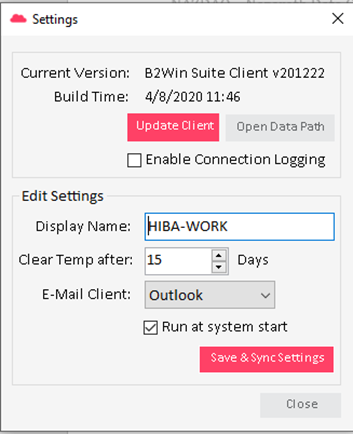
In this window you can see the current version as you can update the client to the latest released version and open the B2Win Suite Client file path on the client. In Edit Settings, you can change the Display name that will be seen in the Connected Clients in B2Win Suite.
Edit Settings
| Setting | Description |
|---|---|
| Clear Temp after | Number of days before the temporary folder is automatically cleaned. |
| E-Mail Client | The mail client installed on your machine. |
| Run at system start | Whether the Desktop Client launches automatically when the system starts. |