Infor CloudSuite
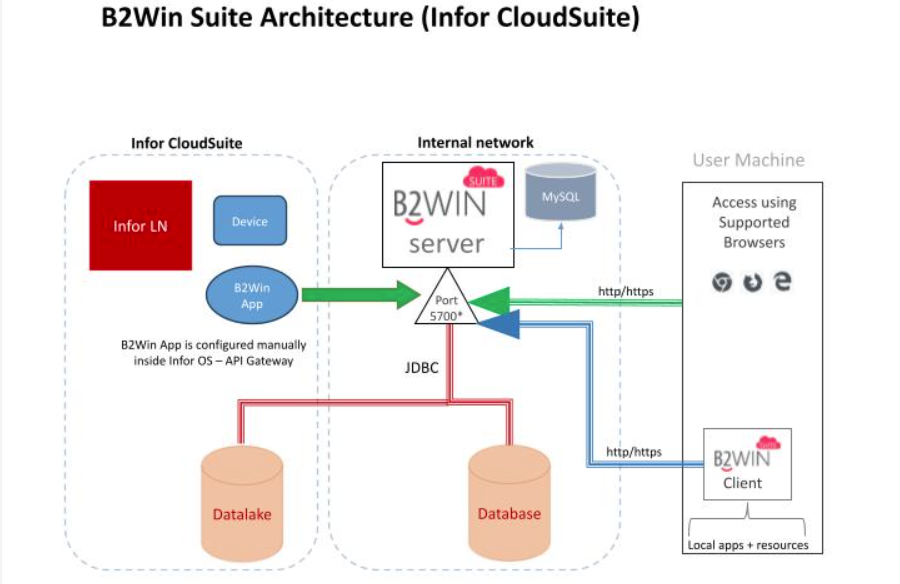
In the Infor CloudSuite deployment model, Infor LN runs within the Infor CloudSuite environment. The B2Win App is configured manually inside Infor OS via the API Gateway to communicate with the B2Win Suite Server hosted on the customer's internal network.
Architecture Overview
The B2Win App in Infor CloudSuite connects to the B2Win Suite Server on port 5700 by default. The B2Win Suite Server connects to both a Datalake and a Database via JDBC. End users access B2Win Suite through supported browsers (Chrome, Edge, or Firefox) or the B2Win Suite Client application running on their machine.
Notes
- The B2Win Suite Server and MySQL are preferred to be on the same machine.
- If B2Win Suite is installed on-premise, the Infor Enterprise Connector must be configured inside Infor CloudSuite.
Firewall Settings
In addition to the Firewall Settings in the Main Setup, a JDBC incoming connection must be enabled on the Database Server from the network/VLAN that hosts the B2Win Suite Server.
The default port is 5700 but it can be changed to any other port. Both HTTP and HTTPS are supported.