B2Output
In case you have the B2Output application and would like to send data from B2Data to it then you can do that by converting your dataframe in B2Data to a txt file using the "TXT Converter" node and then passing this txt file to B2Output node.
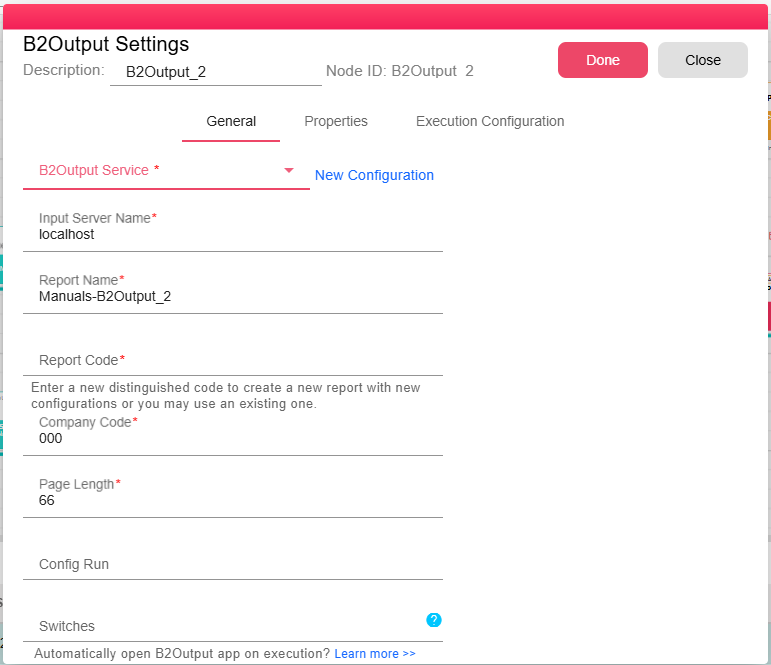
Then when you run your workflow and the B2Output node runs, a report will be created in B2Output Reports with the code and name you selected under the input server chosen in B2Output node in case this report did not exist already.
Then a new run will be created under the selected company and the txt file that was the input for B2Output node will be passed to this new report run in B2Output application.
You can also pass switches or use configured run, just like when running B2Output application from your ERP.
Note that when using the switches -download or -launch, B2Output app must be set to automatically open on execution, otherwise they will be ignored.
In order to open B2Output application for the user, please follow these steps:
- Make sure you have an enabled Input-Form placed on your canvas
- Open Input-Form settings, and add B2Output under Actions > Launch
- Deploy and Publish your workflow to B2Data Reports
- Run your workflow from B2Data Reports