Triggers
Triggers are a type of node but they have the capability of creating new iterations by themselves, for example a Scheduler it's a trigger that is always alive and when the scheduled time has come it will create a new iteration and fire all the nodes in the workflow.
Another example of a trigger can be HTTP Trigger which will always listen to a REST Service and when a request comes it will start a new iteration and execute the nodes.
Triggers shouldn't have an input, but some of them have an output like File Listener which outputs a file, others like scheduler doesn't output anything except they can define properties to be used in the iteration which has been created by them.
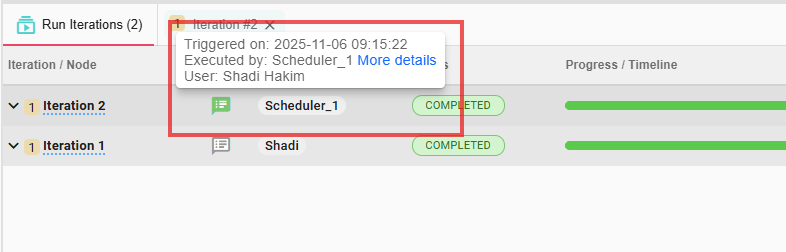
In the bottom bar you can know which iterations has been created by a trigger using a badge next to the iteration:
On/Off actions
Because Triggers are always alive and they run directly underneath an Execution of a workflow and not like the other nodes which they run under a specific iteration, it needs a state for itself, and that state can be turned on and off according to the user's needs.
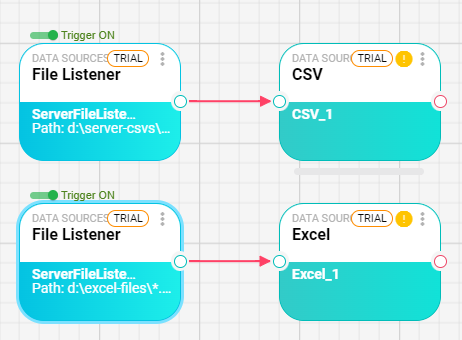
You can define multiple triggers in a workflow as long they all don't share the same path, for example, this is a valid workflow which have two separate triggers and each trigger has its path:
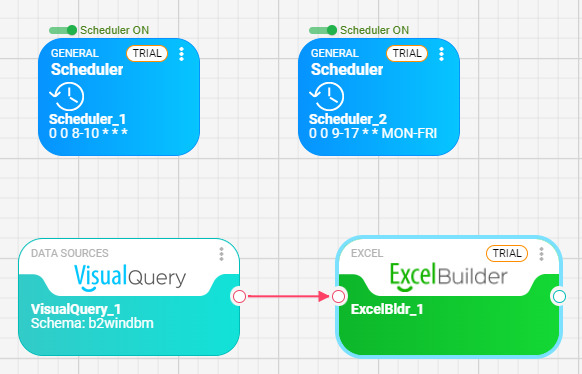
Another valid workflow with two triggers is which they are not connected to specific path like a scheduler, in this case we can add as much as we want schedulers:
Viewing triggers
To view all the triggers running inside a workflow you need to go to the triggers tab at the bottom bar and from there you can manage them like, turn them off and on, and view a run-time message that each trigger generates while executing.
