Query Trigger
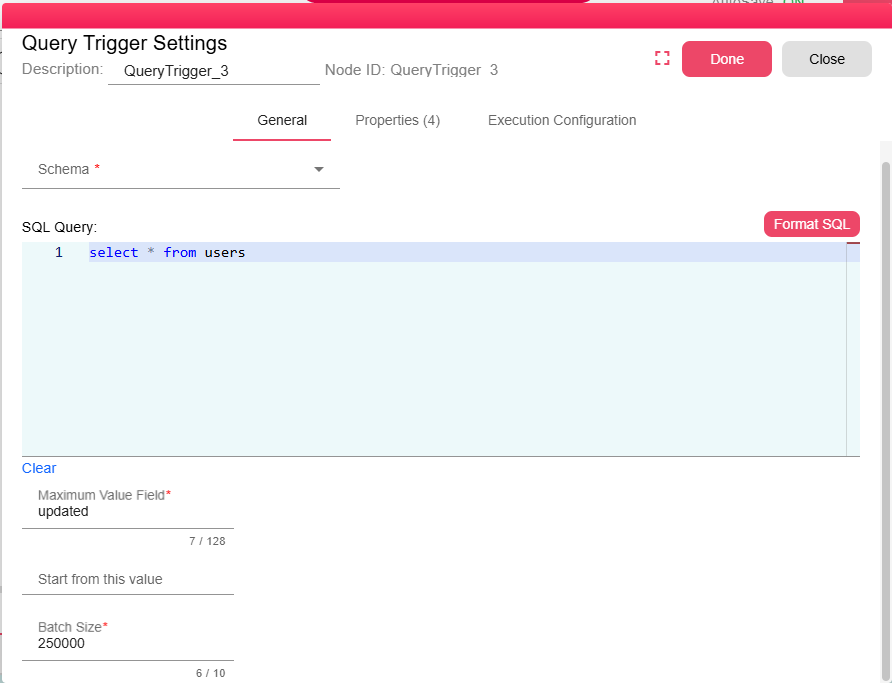
The Query Trigger allows you to run a specific query on your database and keep track of new records according to the maximum value in a particular field. The trigger will automatically initiate a new iteration when new records are added to the database. Follow the steps below to configure and understand its behavior.
The user needs to define the database schema and the SQL query to be executed. This query will be run each time the trigger activates. The query should return the data you need, and it should include the field that you want to track for the maximum value (e.g., a timestamp, ID, or any other field with an incremental value).
The user needs also to set the field that will hold the maximum value for the query trigger. This field should be one that can be incremented or have new records added with higher values (e.g., an ID, timestamp, or version field). The trigger uses this field to determine which records are "new" based on the most recent maximum value.
Once new records are added to the database, the trigger will only fetch records where the selected field (e.g., ID or timestamp) has a value greater than the previously stored maximum field value. This ensures that only new or updated records are retrieved.
The new records that match this condition are outputted in the dataframe table node output.